GhostFlag - CSCG 2023 Qualifier
In this “easy” forensics challenge from the Cybersecurity Challenge Germany 2023 Qualifier, we are given a simple netcat shell that gives us access to a linux machine. The only description that is given to the contestants is the following:
You got access to a secret flag server, but can you find the flag?
The first check after accessing the machine was to list the files in the home directory. This however does not reveal any files. Since the flag is supposed to be secret, it makes sense to also check for hidden files with ls -la. This lists the following interesting content:
Files on target machine
ctf@ghost-flag-pgmsxysakf:/home/ctf$ ls -la
ls -la
total 36
drwxr-x--- 1 ctf  ctf  4096 Mar  7 21:11 .
drwxr-xr-x 1 root root 4096 Mar  4 17:31 ..
-rw------- 1 ctf  ctf  1417 Mar  7 20:52 .bash_history
-rw-r--r-- 1 ctf  ctf   220 Jan  6  2022 .bash_logout
-rw-r--r-- 1 ctf  ctf  3771 Jan  6  2022 .bashrc
-rw-r--r-- 1 ctf  ctf  1024 Mar  7 20:31 .flag.swp
drwxr-xr-x 3 ctf  ctf  4096 Mar  7 20:31 .local
-rw-r--r-- 1 ctf  ctf   807 Jan  6  2022 .profile
As we can see, there is a .flag.swp file in the home directory of the user. Swap files are buffer files in binary that are most commonly known from the texteditor vim. They are usually used to create a temporary copy of a file edited with vim. Trying to simply recover the file with vim however reveals, that neither vim, nor vi are installed on the system. Therefore the next idea was to simply have a look at the contents of the swp file:
ctf@ghost-flag-pgmsxysakf:/home/ctf$ cat .flag.swp
cat .flag.swp
b0nano 6.2
The output here reveals something less known. Not only vim uses swp files, but also the texteditor nano takes advantage of them. The logical next step therefore is to open the file with nano which hopefully recovers the contents of the file. Doing this however, reveals a way more interesting scenario:

Apparently, the flag is currently already being edited. The issue here is, that whatever has been written to this file, has never been saved and therefore the contents of the flag file cannot be simply accessed. However, this still gives us some new, useful information: Most likely, another process is currently in the progress of writing the flag to this file. Checking the running processes makes this scenario even more likely:
ctfghost-flag-pgmsxysakf/home/ctf/flagctf@ghost-flag-pgmsxysakf:/home/ctf$ ps aux
ps aux
USER         PID %CPU %MEM    VSZ   RSS TTY      STAT START   TIME COMMAND
root           1  0.0  0.0  10288  4496 ?        Ss   20:31   0:00 socat tcp-l:1
root           7  0.0  0.0  10288  3056 ?        S    20:31   0:00 socat EXEC:/u
ctf           10  0.0  0.0   3996  2892 ?        S    20:31   0:00 /usr/bin/nano
root         173  0.0  0.0  10288   740 ?        R    20:52   0:00 socat tcp-l:1
ctf          174  0.0  0.0   4628  3700 pts/1    Ss   20:52   0:00 /bin/bash
ctf          193  0.0  0.0   7060  1580 pts/1    R+   21:12   0:00 ps aux
As it can be seen in this output, the ctf user, which is the user we have access to, has a running procces (PID=10) that uses nano. This information reveals the idea behind the challenge: Our user is running a process that uses nano to write the flag into a file. This file however, has never been properly saved on the machine. Therefore we need to get access to the running process which might allow us to read the written flag.
The first idea that came to my mind was to simply look for nano commands that might be able to recover the contents of the file. Looking through the manual of nano unfortunately did not reveal any such options. However, this search resulted in a different option:
In some cases nano will try to dump the buffer into an emergency file. This will happen mainly if nano receives a SIGHUP or SIGTERM or runs out of memory. It will write the buffer into a file named nano.save if the buffer didn't have a name already, or will add a ".save" suffix to the current filename. If an emergency file with that name already exists in the current directory, it will add ".save" plus a number (e.g. ".save.1") to the current filename in order to make it unique. In multibuffer mode, nano will write all the open buffers to their respective emergency files.
The idea here is, that crashing/killing the process will create a .save file that might include the original contents. Trying this with different options however, did not result in anything, since no matter the method of terminating the process, nano never created such a .save file.
The next idea was to read the memory the process is using and hoping that anything a user has currently included in a file will be found in there. This process however, is not as easy as I thought in the beginning. The given machine has only a very limited selection of binaries. The common methods of using gdb, hexdump or a simple C program (no compiler was installed) to extract process memory are therefore not realizable. To check however, if I am even on the right track, I tested my hypothesis on a local machine with full utilities first:
Local PoC
To do this, I opened a file with nano and added some input. Without saving the file, I looked for the corresponding process and dumped the memory used by this process with gcore. A simple strings search already revealed, that the content of the file can be accessed this way.
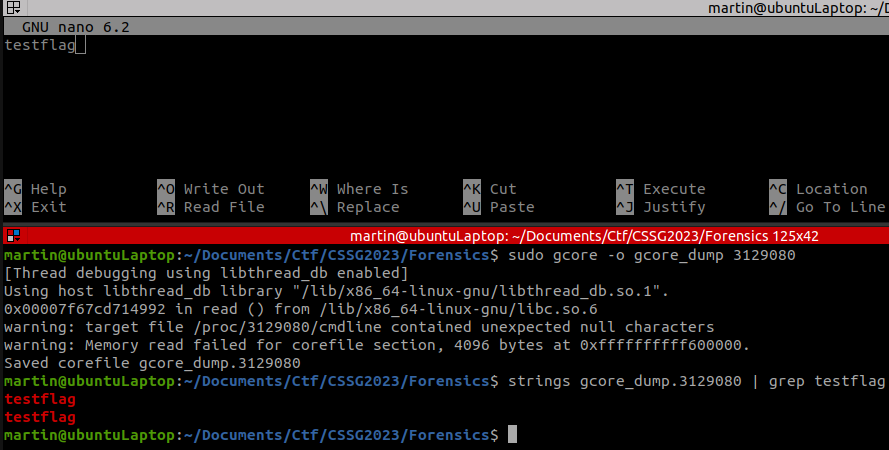
The next step therefore is, to find a way to properly dump the process memory on the given machine and then search for the flag in there.
In the beginning, I was using access to maps to identify which areas in memory the process was using:
ctf@ghost-flag-pibooxqepd:/home/ctf$ cat /proc/10/maps
cat /proc/10/maps
55895ad70000-55895ad75000 r--p 00000000 08:03 3432028                    /usr/bin/nano
55895ad75000-55895ada7000 r-xp 00005000 08:03 3432028                    /usr/bin/nano
55895ada7000-55895adb3000 r--p 00037000 08:03 3432028                    /usr/bin/nano
55895adb4000-55895adb5000 r--p 00043000 08:03 3432028                    /usr/bin/nano
55895adb5000-55895adb6000 rw-p 00044000 08:03 3432028                    /usr/bin/nano
55895adb6000-55895adb7000 rw-p 00000000 00:00 0
55895c08c000-55895c131000 rw-p 00000000 00:00 0                          [heap]
7f07517a1000-7f07517a3000 rw-p 00000000 00:00 0
7f07517a3000-7f07517cb000 r--p 00000000 08:03 3423724                    /usr/lib/x86_64-linux-gnu/libc.so.6
7f07517cb000-7f0751960000 r-xp 00028000 08:03 3423724                    /usr/lib/x86_64-linux-gnu/libc.so.6
7f0751960000-7f07519b8000 r--p 001bd000 08:03 3423724                    /usr/lib/x86_64-linux-gnu/libc.so.6
7f07519b8000-7f07519bc000 r--p 00214000 08:03 3423724                    /usr/lib/x86_64-linux-gnu/libc.so.6
7f07519bc000-7f07519be000 rw-p 00218000 08:03 3423724                    /usr/lib/x86_64-linux-gnu/libc.so.6
7f07519be000-7f07519cb000 rw-p 00000000 00:00 0
7f07519cb000-7f07519d9000 r--p 00000000 08:03 3423842                    /usr/lib/x86_64-linux-gnu/libtin
fo.so.6.3
7f07519d9000-7f07519ea000 r-xp 0000e000 08:03 3423842                    /usr/lib/x86_64-linux-gnu/libtin
fo.so.6.3
7f07519ea000-7f07519f8000 r--p 0001f000 08:03 3423842                    /usr/lib/x86_64-linux-gnu/libtin
fo.so.6.3
7f07519f8000-7f07519fc000 r--p 0002c000 08:03 3423842                    /usr/lib/x86_64-linux-gnu/libtin
fo.so.6.3
7f07519fc000-7f07519fd000 rw-p 00030000 08:03 3423842                    /usr/lib/x86_64-linux-gnu/libtin
fo.so.6.3
7f07519fd000-7f0751a05000 r--p 00000000 08:03 3423788                    /usr/lib/x86_64-linux-gnu/libncu
rsesw.so.6.3
7f0751a05000-7f0751a2e000 r-xp 00008000 08:03 3423788                    /usr/lib/x86_64-linux-gnu/libncu
rsesw.so.6.3
7f0751a2e000-7f0751a36000 r--p 00031000 08:03 3423788                    /usr/lib/x86_64-linux-gnu/libncu
rsesw.so.6.3
7f0751a36000-7f0751a37000 ---p 00039000 08:03 3423788                    /usr/lib/x86_64-linux-gnu/libncu
rsesw.so.6.3
7f0751a37000-7f0751a38000 r--p 00039000 08:03 3423788                    /usr/lib/x86_64-linux-gnu/libncu
rsesw.so.6.3
7f0751a38000-7f0751a39000 rw-p 0003a000 08:03 3423788                    /usr/lib/x86_64-linux-gnu/libncu
rsesw.so.6.3
7f0751a3b000-7f0751a3d000 rw-p 00000000 00:00 0
7f0751a3d000-7f0751a3f000 r--p 00000000 08:03 3423706                    /usr/lib/x86_64-linux-gnu/ld-lin
ux-x86-64.so.2
7f0751a3f000-7f0751a69000 r-xp 00002000 08:03 3423706                    /usr/lib/x86_64-linux-gnu/ld-lin
ux-x86-64.so.2
7f0751a69000-7f0751a74000 r--p 0002c000 08:03 3423706                    /usr/lib/x86_64-linux-gnu/ld-lin
ux-x86-64.so.2
7f0751a75000-7f0751a77000 r--p 00037000 08:03 3423706                    /usr/lib/x86_64-linux-gnu/ld-lin
ux-x86-64.so.2
7f0751a77000-7f0751a79000 rw-p 00039000 08:03 3423706                    /usr/lib/x86_64-linux-gnu/ld-lin
ux-x86-64.so.2
7ffc2a72b000-7ffc2a74c000 rw-p 00000000 00:00 0                          [stack]
7ffc2a78f000-7ffc2a793000 r--p 00000000 00:00 0                          [vvar]
7ffc2a793000-7ffc2a795000 r-xp 00000000 00:00 0                          [vdso]
ffffffffff600000-ffffffffff601000 --xp 00000000 00:00 0                  [vsyscall]
This information was then used to manually extract the different bytes stored in all memory locations using dd. For some reason however, I was not able to find the flag this way. Knowing what I was looking for, made it possible to once again use the internet to easen my life as I was able to find a fully functioning bash script that did exactly what I was looking for: https://serverfault.com/a/408929
Script
# /bin/bash

cat /proc/$1/maps | grep "rw-p" | awk '{print $1}' | ( IFS="-"
    while read a b; do
        dd if=/proc/$1/mem bs=$( getconf PAGESIZE ) iflag=skip_bytes,count_bytes \
           skip=$(( 0x$a )) count=$(( 0x$b - 0x$a )) of="$1_mem_$a.bin"
    done )
Running this script created multiple files for the different memory locations.
ctf@ghost-flag-pgmsxysakf:/home/ctf$ ls -la
ls -la
total 932
drwxr-x--- 1 ctf  ctf    4096 Mar  7 21:16 .
drwxr-xr-x 1 root root   4096 Mar  4 17:31 ..
-rw------- 1 ctf  ctf    1417 Mar  7 20:52 .bash_history
-rw-r--r-- 1 ctf  ctf     220 Jan  6  2022 .bash_logout
-rw-r--r-- 1 ctf  ctf    3771 Jan  6  2022 .bashrc
-rw-r--r-- 1 ctf  ctf    1024 Mar  7 20:31 .flag.swp
drwxr-xr-x 3 ctf  ctf    4096 Mar  7 20:31 .local
-rw-r--r-- 1 ctf  ctf     807 Jan  6  2022 .profile
-rw-r--r-- 1 ctf  ctf    4096 Mar  7 21:16 10_mem_55d9535b4000.bin
-rw-r--r-- 1 ctf  ctf    4096 Mar  7 21:16 10_mem_55d9535b5000.bin
-rw-r--r-- 1 ctf  ctf  675840 Mar  7 21:16 10_mem_55d95420d000.bin
-rw-r--r-- 1 ctf  ctf    8192 Mar  7 21:16 10_mem_7fbe9000a000.bin
-rw-r--r-- 1 ctf  ctf    8192 Mar  7 21:16 10_mem_7fbe90225000.bin
-rw-r--r-- 1 ctf  ctf   53248 Mar  7 21:16 10_mem_7fbe90227000.bin
-rw-r--r-- 1 ctf  ctf    4096 Mar  7 21:16 10_mem_7fbe90265000.bin
-rw-r--r-- 1 ctf  ctf    4096 Mar  7 21:16 10_mem_7fbe902a1000.bin
-rw-r--r-- 1 ctf  ctf    8192 Mar  7 21:16 10_mem_7fbe902a4000.bin
-rw-r--r-- 1 ctf  ctf    8192 Mar  7 21:16 10_mem_7fbe902e0000.bin
-rw-r--r-- 1 ctf  ctf  135168 Mar  7 21:16 10_mem_7ffea3647000.bin
-rwxr-xr-x 1 ctf  ctf     252 Mar  7 21:15 dump.sh
From here, it was a simple search for the correct flag format through the different memory dumps:
ctf@ghost-flag-pgmsxysakf:/home/ctf$ grep -r "CSCG" .
grep -r "CSCG" .
grep: ./10_mem_55d95420d000.bin: binary file matches
