File Recovery Tool
In a recent decision to recover my C skills, I decided to work on some smaller projects. One of these projects is supposed to be a file recovery tool that might allow me to recover files that I have accidentally deleted on my Ubuntu machine. To start working on this project, I first had to figure out how files are stored in Linux and what the ‘rm’ command actually does. Based on this information, I then proceeded to write my C program that searches and recovers the deleted file. But first, let us have a look at how Linux handles files or more importantly, how it removes them:
Linux file handling and rm command
My first idea here, was to check how rm works to figure out to what extent Linux actually allows the recovery of removed files. One often hears, that ‘deleting’ a file does not actually remove any of its data but only removes the link that points to the file. So in theory, it should be possible to find the address of the beginning of the actual file in memory and then recover all its contents.
To check, if this myth is actually true, I decided to have a look at the ‘rm’ command first, since this is how one usually deletes files on Linux. The man page of the command already gives us a nice hint on how insecure the deletion of a file actually is:
(https://www.gnu.org/software/coreutils/manual/html_node/rm-invocation.html#rm-invocation)
_Warning_: If you use `rm` to remove a file, it is usually possible to recover the contents of that file. If you want more assurance that the contents are unrecoverable, consider using `shred`.
So even the man page already warns us, that it is possible to recover the data.
This gives me a lot of hope that recovering the contents is probably not that difficult. So let’s figure out, what ‘rm’ actually does to make a file disappear. Since Linux and its commands are open source, this should not be a problem:
(https://github.com/coreutils/coreutils/blob/master/src/rm.c)
Now that we have the source code of the command, we can follow the steps that the tool goes through when we execute it in the normal way (without any options given, like ‘rm testfile’):
Since we are not really interested in it, we can actually skip all of the flag handling and move straight to the part of the deletion.
uintmax_t n_files = argc - optind;
char **file =  argv + optind;

if (prompt_once && (x.recursive || 3 < n_files))
  {
	fprintf (stderr,
			  (x.recursive
	           ? ngettext ("%s: remove %"PRIuMAX" argument recursively? ",
                           "%s: remove %"PRIuMAX" arguments recursively? ",
                           select_plural (n_files))
               : ngettext ("%s: remove %"PRIuMAX" argument? ",
                           "%s: remove %"PRIuMAX" arguments? ",
                           select_plural (n_files))),
               program_name, n_files);
	    if (!yesno ())
		  return EXIT_SUCCESS;
  }

enum RM_status status = rm (file, &x);
affirm (VALID_STATUS (status));
return status == RM_ERROR ? EXIT_FAILURE : EXIT_SUCCESS;
In the first two lines, we simply figure out how many files we have to delete and then store all the file handles to those file. The tool then prints some text in case we want to recursively remove some files, and then executes the actual rm function in line 18.
So probably, the ‘rm’ function is what we are actually interested in, since it takes the file and x which is the rm_options struct. The function can be found here:
https://github.com/coreutils/coreutils/blob/master/src/remove.c#L604
So let’s check what this function does to our file:
rm (char *const *file, struct rm_options const *x)
{
  enum RM_status rm_status = RM_OK;
  if (*file)
    {
      int bit_flags = (FTS_CWDFD
                       | FTS_NOSTAT
                       | FTS_PHYSICAL);
      if (x->one_file_system)
        bit_flags |= FTS_XDEV;
      FTS *fts = xfts_open (file, bit_flags, nullptr);
      while (true)
        {
          FTSENT *ent;
          ent = fts_read (fts);
          if (ent == nullptr)
            {
              if (errno != 0)
                {
                  error (0, errno, _("fts_read failed"));
                  rm_status = RM_ERROR;
                }
              break;
            }
          enum RM_status s = rm_fts (fts, ent, x);
          affirm (VALID_STATUS (s));
          UPDATE_STATUS (rm_status, s);
        }
      if (fts_close (fts) != 0)
        {
          error (0, errno, _("fts_close failed"));
          rm_status = RM_ERROR;
        }
    }
  return rm_status;
}
We can skip the first part of the function for now and focus on the section that handles everything happening after the file is opened:
FTS *fts = xfts_open (file, bit_flags, nullptr);
First, we have to figure out what xfts_open does to our file. To do this, let’s have a look at the man page of fts:
The fts functions are provided for traversing file hierarchies.
A simple overview is that the **fts_open**() function returns a "handle" (of type _FTS *_) that refers to a file hierarchy "stream". This handle is then supplied to the other fts functions.
So it looks like the function is simply used to get a file handle that can then be used by the other functions to actually read the file. Very much like the more commonly known ‘open’ command.
In the next step, the function begins to read the file. Now we continue with the next interestingly looking function:
enum RM_status s = rm_fts (fts, ent, x);
rm_fts performs a bunch of checks to handle special cases. However, since we are only interested in simple, basic files, we can once again skip understanding most of the code and go to the switch case in the function that actually applies to our case:
{
        /* With --one-file-system, do not attempt to remove a mount point.
           fts' FTS_XDEV ensures that we don't process any entries under
           the mount point.  */
        if (ent->fts_info == FTS_DP
            && x->one_file_system
            && FTS_ROOTLEVEL < ent->fts_level
            && ent->fts_statp->st_dev != fts->fts_dev)
          {
            mark_ancestor_dirs (ent);
            error (0, 0, _("skipping %s, since it's on a different device"),
                   quoteaf (ent->fts_path));
            return RM_ERROR;
          }

        bool is_dir = ent->fts_info == FTS_DP || ent->fts_info == FTS_DNR;
        enum RM_status s = prompt (fts, ent, is_dir, x, PA_REMOVE_DIR,
                                   &dir_status);
        if (! (s == RM_OK || s == RM_USER_ACCEPTED))
          return s;
        return excise (fts, ent, x, is_dir);
      }
As it can be seen here, we mostly check if the fts info is what we want it to be, and then we return the results of the excise function:
/* Remove the file system object specified by ENT.  IS_DIR specifies
   whether it is expected to be a directory or non-directory.
   Return RM_OK upon success, else RM_ERROR.  */
static enum RM_status
excise (FTS *fts, FTSENT *ent, struct rm_options const *x, bool is_dir)
{
  int flag = is_dir ? AT_REMOVEDIR : 0;
  if (unlinkat (fts->fts_cwd_fd, ent->fts_accpath, flag) == 0)
    {
      if (x->verbose)
        {
          printf ((is_dir
                   ? _("removed directory %s\n")
                   : _("removed %s\n")), quoteaf (ent->fts_path));
        }
      return RM_OK;
    }

  /* The unlinkat from kernels like linux-2.6.32 reports EROFS even for
     nonexistent files.  When the file is indeed missing, map that to ENOENT,
     so that rm -f ignores it, as required.  Even without -f, this is useful
     because it makes rm print the more precise diagnostic.  */
  if (errno == EROFS)
    {
      struct stat st;
      if ( ! (fstatat (fts->fts_cwd_fd, ent->fts_accpath, &st,
                       AT_SYMLINK_NOFOLLOW)
              && errno == ENOENT))
        errno = EROFS;
    }

  if (ignorable_missing (x, errno))
    return RM_OK;

  /* When failing to rmdir an unreadable directory, we see errno values
     like EISDIR or ENOTDIR (or, on Solaris 10, EEXIST), but they would be
     meaningless in a diagnostic.  When that happens, use the earlier, more
     descriptive errno value.  */
  if (ent->fts_info == FTS_DNR
      && (errno == ENOTEMPTY || errno == EISDIR || errno == ENOTDIR
          || errno == EEXIST)
      && ent->fts_errno != 0)
    errno = ent->fts_errno;
  error (0, errno, _("cannot remove %s"), quoteaf (ent->fts_path));
  mark_ancestor_dirs (ent);
  return RM_ERROR;
}
Now as seen in this line
if (unlinkat (fts->fts_cwd_fd, ent->fts_accpath, flag) == 0)
the function just calls the unlinkat system call to handle the deletion. To verify if I messed up my analysis this far, I decided to run strace on the actual ‘rm’ command. This is something I realized I should have done at the beginning as it would have saved me a lot of work of digging through the source code. So first lesson learned:
To figure out what a program does, it is not always necessary to dig through the code.
Anyways, lets have a look at the strace output:
execve("/usr/bin/rm", ["rm", "testfile"], 0x7fffffffdd68 /* 65 vars */) = 0
brk(NULL)                               = 0x555555564000
arch_prctl(0x3001 /* ARCH_??? */, 0x7fffffffdb90) = -1 EINVAL (Invalid argument)
mmap(NULL, 8192, PROT_READ|PROT_WRITE, MAP_PRIVATE|MAP_ANONYMOUS, -1, 0) = 0x7ffff7fbb000
access("/etc/ld.so.preload", R_OK)      = -1 ENOENT (No such file or directory)
openat(AT_FDCWD, "/etc/ld.so.cache", O_RDONLY|O_CLOEXEC) = 3
newfstatat(3, "", {st_mode=S_IFREG|0644, st_size=115831, ...}, AT_EMPTY_PATH) = 0
mmap(NULL, 115831, PROT_READ, MAP_PRIVATE, 3, 0) = 0x7ffff7f9e000
close(3)                                = 0
openat(AT_FDCWD, "/lib/x86_64-linux-gnu/libc.so.6", O_RDONLY|O_CLOEXEC) = 3
read(3, "\177ELF\2\1\1\3\0\0\0\0\0\0\0\0\3\0>\0\1\0\0\0P\237\2\0\0\0\0\0"..., 832) = 832
pread64(3, "\6\0\0\0\4\0\0\0@\0\0\0\0\0\0\0@\0\0\0\0\0\0\0@\0\0\0\0\0\0\0"..., 784, 64) = 784
pread64(3, "\4\0\0\0 \0\0\0\5\0\0\0GNU\0\2\0\0\300\4\0\0\0\3\0\0\0\0\0\0\0"..., 48, 848) = 48
pread64(3, "\4\0\0\0\24\0\0\0\3\0\0\0GNU\0i8\235HZ\227\223\333\350s\360\352,\223\340."..., 68, 896) = 68
newfstatat(3, "", {st_mode=S_IFREG|0644, st_size=2216304, ...}, AT_EMPTY_PATH) = 0
pread64(3, "\6\0\0\0\4\0\0\0@\0\0\0\0\0\0\0@\0\0\0\0\0\0\0@\0\0\0\0\0\0\0"..., 784, 64) = 784
mmap(NULL, 2260560, PROT_READ, MAP_PRIVATE|MAP_DENYWRITE, 3, 0) = 0x7ffff7c00000
mmap(0x7ffff7c28000, 1658880, PROT_READ|PROT_EXEC, MAP_PRIVATE|MAP_FIXED|MAP_DENYWRITE, 3, 0x28000) = 0x7ffff7c28000
mmap(0x7ffff7dbd000, 360448, PROT_READ, MAP_PRIVATE|MAP_FIXED|MAP_DENYWRITE, 3, 0x1bd000) = 0x7ffff7dbd000
mmap(0x7ffff7e15000, 24576, PROT_READ|PROT_WRITE, MAP_PRIVATE|MAP_FIXED|MAP_DENYWRITE, 3, 0x214000) = 0x7ffff7e15000
mmap(0x7ffff7e1b000, 52816, PROT_READ|PROT_WRITE, MAP_PRIVATE|MAP_FIXED|MAP_ANONYMOUS, -1, 0) = 0x7ffff7e1b000
close(3)                                = 0
mmap(NULL, 12288, PROT_READ|PROT_WRITE, MAP_PRIVATE|MAP_ANONYMOUS, -1, 0) = 0x7ffff7f9b000
arch_prctl(ARCH_SET_FS, 0x7ffff7f9b740) = 0
set_tid_address(0x7ffff7f9ba10)         = 1302150
set_robust_list(0x7ffff7f9ba20, 24)     = 0
rseq(0x7ffff7f9c0e0, 0x20, 0, 0x53053053) = 0
mprotect(0x7ffff7e15000, 16384, PROT_READ) = 0
mprotect(0x555555562000, 4096, PROT_READ) = 0
mprotect(0x7ffff7ffb000, 8192, PROT_READ) = 0
prlimit64(0, RLIMIT_STACK, NULL, {rlim_cur=8192*1024, rlim_max=RLIM64_INFINITY}) = 0
munmap(0x7ffff7f9e000, 115831)          = 0
getrandom("\xef\x06\xe0\xbc\x9c\x00\x8b\x23", 8, GRND_NONBLOCK) = 8
brk(NULL)                               = 0x555555564000
brk(0x555555585000)                     = 0x555555585000
openat(AT_FDCWD, "/usr/lib/locale/locale-archive", O_RDONLY|O_CLOEXEC) = 3
newfstatat(3, "", {st_mode=S_IFREG|0644, st_size=14575936, ...}, AT_EMPTY_PATH) = 0
mmap(NULL, 14575936, PROT_READ, MAP_PRIVATE, 3, 0) = 0x7ffff6e00000
close(3)                                = 0
ioctl(0, TCGETS, {B38400 opost isig icanon echo ...}) = 0
newfstatat(AT_FDCWD, "testfile", {st_mode=S_IFREG|0664, st_size=5, ...}, AT_SYMLINK_NOFOLLOW) = 0
geteuid()                               = 1000
newfstatat(AT_FDCWD, "testfile", {st_mode=S_IFREG|0664, st_size=5, ...}, AT_SYMLINK_NOFOLLOW) = 0
faccessat2(AT_FDCWD, "testfile", W_OK, AT_EACCESS) = 0
unlinkat(AT_FDCWD, "testfile", 0)       = 0
lseek(0, 0, SEEK_CUR)                   = -1 ESPIPE (Illegal seek)
close(0)                                = 0
close(1)                                = 0
close(2)                                = 0
exit_group(0)                           = ?
+++ exited with 0 +++
As we can see, we open the file and read a bunch of stuff. Then, at the end of the output, we can find what we were looking for:
unlinkat(AT_FDCWD, "testfile", 0) = 0
So we just have to figure out what unlinkat does and should then finally reach our goal of learning how rm works. As is turns out, rm is just sort of a superset of unlink/unlinkat that performs a bunch of additional checks.
The unlinkat man page gives us all the information we know:
(https://man7.org/linux/man-pages/man2/unlink.2.html)
The unlinkat() system call operates in exactly the same way as either unlink() or [rmdir(2)](https://man7.org/linux/man-pages/man2/rmdir.2.html) (depending on whether or not _flags_ includes the AT_REMOVEDIR flag) except for the differences described here.
The differences to the unlink system call can be neglected for now, which means that we can just continue looking at unlink for simplicity reasons:
unlink() deletes a name from the filesystem.  If that name was
the last link to a file and no processes have the file open, the
file is deleted and the space it was using is made available for
reuse.

If the name was the last link to a file but any processes still
have the file open, the file will remain in existence until the
last file descriptor referring to it is closed.

If the name referred to a symbolic link, the link is removed.

If the name referred to a socket, FIFO, or device, the name for
it is removed but processes which have the object open may
continue to use it.
Finally, we know what is happening when we call our ‘rm’ command. All it does, it simply delete the name from the filesystem and then calls it a day. So the data of the file is never actually deleted or overwritten, it is actually just the ’last link’ to a file that is removed.
Based on this knowledge now, I decided to build a Proof of Concept for my data recovery tool by following these simple steps:
- Create a file
- Figure out where the file is stored on the disk
- Delete the file
- Read the content of the disk location the file was previously stored
Figuring out where the file is stored on the disk
Considering that our file must be stored somewhere on the disk, we can assume that the system has to have a way to figure out where exactly on the disk our file is stored and therefore must be able to link the filename to a specific location on disk. So our first step is to explore how the OS knows at what location on the disk a file is stored.
Doing research on this, I found a nice little overview over how the OS remembers all this information and more specifically, how disk storage works.
(https://unix.stackexchange.com/questions/652047/how-does-the-os-access-files-stored-on-the-hard-disk)
Apparently, a disk is divided in multiple blocks of storage. The kernel uses drivers for the file systems to read and write these blocks, or more specifically, file contents stored in these blocks. To paraphrase what the answer is saying, let me list the different, important sections required to handle disk storage:
- Blocks: storage on the disk is divided in multiple block with data
- Block Groups: blocks part of a larger block group
- Inode: a structured set of information about an entry on the disk (e.g file, directory). This inode holds information about a block group
- Directory: a list of inodes <-> names
- Super-Block: holds information about e.g number of blocks in a group, inodes, …
- Block Group Descriptor Table: hold information about block groups The answer even lists what kind of information each structure holds:
- Super-Block
- total number of inodes
- total number of blocks
- number of blocks in a group
- number of inodes in a group
- Block Group Descriptor Table
- number of block groups in the partition
- descriptor for each block group
- Inode (Index Node)
- type, permission, user, dates, …
- pointers to data Based of this information, we can think about a way of accessing the file. Based on the filename, there must be a way of finding the corresponding Inode and therefore retrieve the pointer to the data.
Inode
Based on our current information, it would be nice to review the Inode data of a file. From there, we might get further ideas on how to actually access the data. To do this, I decided to use the ‘stat’ command which gives us some of the information we are interested in:
  File: testfile
  Size: 5         	Blocks: 8          IO Block: 4096   regular file
Device: 10302h/66306d	Inode: 12719601    Links: 1
Access: (0664/-rw-rw-r--)  Uid: ( 1000/  martin)   Gid: ( 1000/  martin)
Access: 2023-09-03 21:05:34.664040682 +0200
Modify: 2023-09-03 21:05:34.664040682 +0200
Change: 2023-09-03 21:05:34.664040682 +0200
 Birth: 2023-09-03 21:05:34.664040682 +0200
Based on this output, we can see the index of the node, the IO Block size and the amount of blocks for the file.
With this new knowledge, I did some further research. Turns out, there is a command that allows us to find the physical location on our partition:
filefrag -v testfile
Filesystem type is: ef53
File size of testfile is 9 (1 block of 4096 bytes)
 ext:     logical_offset:        physical_offset: length:   expected: flags:
   0:        0..       0:   39519538..  39519538:      1:             last,eof
testfile: 1 extent found
Read the content of the disk location the file was previously stored
Now we know how big the offset from our physical start address is (39519538). This should be all the information we need. In theory, all we have to do form here is to read a bunch of bytes at the known physical offset from our partition. First, I had to figure out, what the name of my actual partition is:
df .
Filesystem     1K-blocks      Used Available Use% Mounted on
/dev/nvme0n1p2 490617784 240765100 224857204  52% /
Based on this information, we can use the dd command, to finally read the data we’ve been looking for:
sudo dd bs=4k skip=39519538 count=1 if=/dev/nvme0n1p2
test1234
1+0 records in
1+0 records out
4096 bytes (4,1 kB, 4,0 KiB) copied, 3,6266e-05 s, 113 MB/s
Now we can test if deleting the file removes the data or not. To do this, I simply created a file, looked up all the location information I needed and then deleted it again. If we want to actually be able to recover the data from a delete file, reading the known offset must still contain the wanted information:
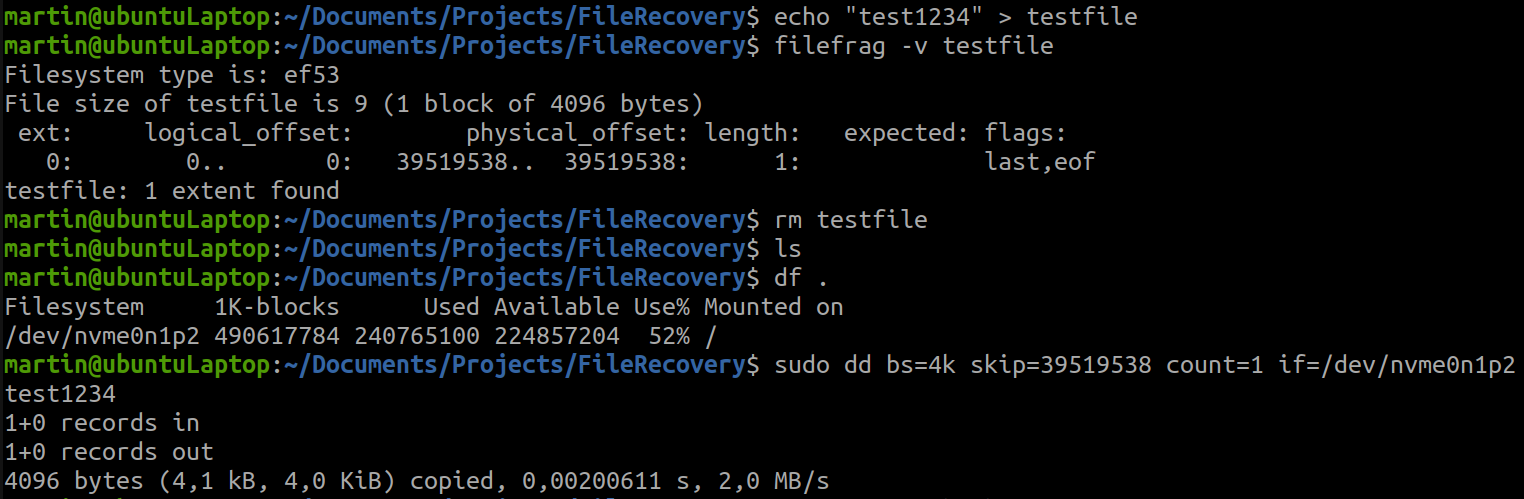 Looks like we are lucky and actually able to read a ‘deleted’ file this way.
However, this is only the first part of the deal. Let us assume that we want to read a file that has already been deleted before we looked up the physical offset. Then based on our current method, we have no way of figuring out where we have to look for our data. This is where I decided to use a typical brute force approach and simply search on the entire partition for a specific sequence of characters.
In this case, we know that the data consists of the string “test1234”. So we should be able to recover the bytes that represent these characters.